Using ortho-scenery offers an interesting opportunity to disregard X-Plane airport textures and instead use the ortho to show where dirt or grass runways are. I’ve done a quick test of this at Omarama and quite like the results.


The problem with standard runway textures is that the grass etc tends look pretty cartoony, but it has bump mapping which is good for up close. In WED it’s possible to create a runway which is set to ‘transparent’. This means your plane will behave as though it’s on a runway, but you won’t see it. So instead you’re left with the underlying ortho scenery.
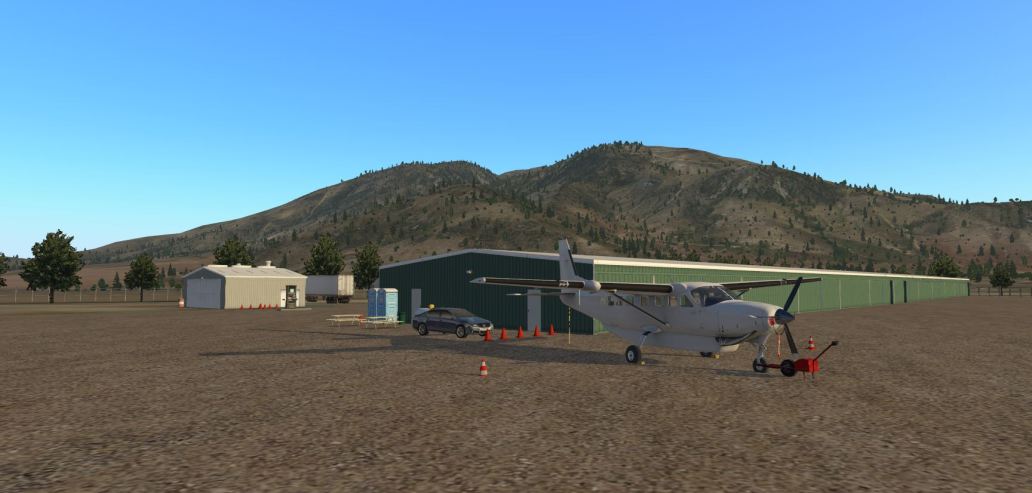
If you have the ortho at Omarama you can try this out using this airport. I *think* it’s in the West Coast region of the ortho. It’s a good place to fly out of as it’s not too constrained by hills and gives you a good view of the Alps on the way to Queenstown.
Categories: Flight Simulation
 New airport: NZKM Karamea
  Planting seeds
  Landing now: Lyndiman NZ Ortho 2025 is now available.
  Sounds like a good idea
  Lyndiman's Blog
Is that the new Caravan 208 for XP11 in that last shot?
Yep
I always wondered what transparent runways were for.
And Omaramara is the gliding center of NZ on otago. and to get to the west coast you have to cross the Alps.
Your NZOA looks nothing like mine which must be the current x-plane 11 default. I have searched for another version but cant locate one! I have installed this file. Can you please advise which version of NZOA you are using? Thanks
It should be this one linked in my post above: https://mega.nz/#!HRwizIAY!nSYfyP485Gv76iE1xeT3xnWBnQok63HonPWb21tFmmI
If you add that to the custom scenery folder it should overwrite the default